- 1. What is a project status report?
- 2. Why project status reporting matters more than you think
- 3. The key sections of a project status report
- 4. Understanding RAG status: Red, Amber, and Green
- 5. How to write a project status report, step by step
- 6. Common mistakes early-career professionals make
- 7. Presenting your status report: why how you present it matters
- 8. Using pre-built templates to save time and look professional
- 9. How often should you report?
- 10. Quick-reference FAQ

- 1. What is a project status report?
- 2. Why project status reporting matters more than you think
- 3. The key sections of a project status report
- 4. Understanding RAG status: Red, Amber, and Green
- 5. How to write a project status report, step by step
- 6. Common mistakes early-career professionals make
- 7. Presenting your status report: why how you present it matters
- 8. Using pre-built templates to save time and look professional
- 9. How often should you report?
- 10. Quick-reference FAQ


You have just been handed your first real project at work and your manager wants a “status report” by Friday. You nod confidently. Then you open a blank document and stare at it. If this sounds familiar, this guide is for you.
1. What is a project status report?
A project status report is a structured document or presentation that communicates the current health, progress, and outlook of a project to its stakeholders. Think of it as a health check-up for your project. Just as a doctor reviews vitals to assess a patient’s condition, a status report gives decision-makers a clear picture of where things stand, what is going well, and what needs attention.
At its core, a project status report answers three questions:
- Where are we? Progress against milestones and deliverables.
- Are we on track? Budget, timeline, and scope status.
- What do stakeholders need to know? Risks, blockers, decisions needed, and next steps.
Status reports can be informal (a quick Slack update) or formal (a detailed slide deck presented in a steering committee meeting). As a professional starting your corporate career, you will encounter both, and the underlying principles are the same.
| Key distinction: A project plan is a forward-looking document that defines what you will do. A status report is a periodic snapshot that reflects what has actually happened and what the project’s current outlook is. |
2. Why project status reporting matters more than you think
Many early-career professionals treat status reporting as administrative busywork. This is a mistake. Good status reporting is one of the most underrated professional skills you can develop.
It builds trust with leadership
When you consistently deliver clear, accurate, and timely status reports, stakeholders do not need to chase you for updates. You become the person who is on top of things. That reputation compounds quickly in a corporate environment.
It forces you to understand your own project
The act of writing a status report forces you to think critically about what is actually happening on the project. It is surprisingly easy to be busy without being productive. Preparing a report surfaces that distinction fast.
It is a paper trail that protects you
If a project goes sideways, those who documented risks and escalated issues in writing are far better positioned than those who did not. Status reports create a timestamped record of what was known, when, and by whom.
It is a visibility opportunity
In large organizations, your work is only as visible as how well you communicate it. A polished status report shared with the right people is an opportunity to showcase your competence to leaders who may not see your day-to-day contributions.
3. The key sections of a project status report
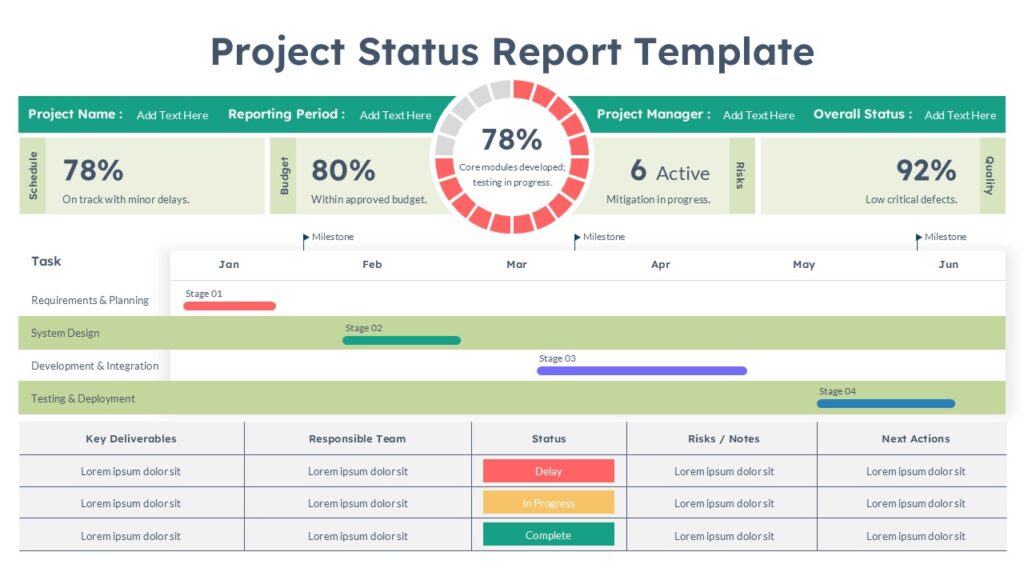
While every organization has its own templates and preferences, most project status reports contain the following core sections. Understanding what goes in each one is essential before you start writing.
- Executive Summary: A 2 to 4 sentence overview of the project’s current health. Written for senior stakeholders who may not read the rest.
- Overall Status (RAG): A Red, Amber, or Green indicator that immediately communicates whether the project is on track, at risk, or in trouble.
- Progress This Period: What was accomplished since the last report. Milestones reached, deliverables completed, and key activities done.
- Planned vs. Actual: A comparison of what was supposed to happen versus what actually happened, covering schedule, budget, and scope.
- Risks and Issues: What could go wrong (risks) or has already gone wrong (issues), along with the planned mitigation or resolution.
- Decisions Needed: Specific questions or decisions that need stakeholder input before the project can proceed.
- Next Steps: What the team will work on in the next reporting period. Makes the report forward-looking, not just a history lesson.
- Budget Summary: Actual spend versus budget to date, plus a forecast for the remainder of the project.
| Pro tip: Put your executive summary and overall RAG status at the very top. Most senior stakeholders will only read the first slide or first paragraph. Make every word there count. |
4. Understanding RAG status: Red, Amber, and Green
The RAG (Red, Amber, Green) status is a traffic-light system used to communicate project health at a glance. It is one of the most widely used conventions in corporate project reporting, and you will encounter it in virtually every professional environment.
| Status | What it means | When to use it |
| GREEN | On track. No significant issues. Delivery within agreed scope, time, and budget. | When the project is progressing as planned with no material risks to delivery. |
| AMBER | At risk. There are issues that, if unresolved, could affect delivery. Mitigation is possible. | When there are known risks or minor delays but the project can still succeed with action. |
| RED | Off track. The project is in significant trouble. Escalation or intervention is likely needed. | When the project is behind schedule, over budget, or facing an unresolvable blocker. |
| Common mistake: Many early-career professionals are afraid to report Amber or Red because they worry it reflects badly on them. The opposite is true. Reporting Amber early, before a project turns Red, is a sign of good judgment. Hiding problems until they become crises is what damages careers. |
In practice, you may also see RAG applied to individual components. For example, a project might be overall Green but have an Amber on budget and a separate Red on a specific dependency or resource. This granularity helps stakeholders quickly identify where to focus attention.
5. How to write a project status report, step by step
Here is a practical, step-by-step process for producing a status report, even if it is your first time doing it.
- Know your audience first. Before you write a single word, ask yourself: who will read this? A report for your direct manager is very different from one going to a steering committee of senior executives. Adjust the level of technical detail, the length, and the tone accordingly.
- Gather your data before you write. Pull together task completion data, milestone status, budget actuals, and any open risks or issues. Do not rely on memory. Talk to the people working on the project, as they will know things you do not.
- Write the body before the summary. It sounds counterintuitive, but write your progress, risks, and next steps sections first. Your executive summary should emerge from those, not the other way around.
- Assign your RAG status deliberately. Based on what you have written, make a conscious judgment call on the overall status. Be honest. If in doubt between Amber and Red, ask your manager before publishing.
- Write the executive summary last. Distill the entire report into 2 to 4 sentences. State the overall status, the key highlight, the most important risk, and what decision or action is needed from stakeholders, if any.
- Review for clarity, not length. Read it back from the perspective of someone who knows nothing about the day-to-day of the project. Is everything clear? Eliminate jargon and avoid burying key information in paragraphs. Use bullet points or tables where possible.
- Format and present it professionally. If your report is shared as a slide deck, make sure it looks polished. Use consistent formatting, clear headings, and visual hierarchy. A report that is hard to read is a report that does not get read.
| Writing tip: Keep your language direct and factual. Avoid softening bad news with vague language like “there are some challenges.” Say what the challenge is, what the impact is, and what you are doing about it. |
6. Common mistakes early-career professionals make
Knowing what not to do is just as useful as knowing what to do. Here are the most frequent errors when writing project status reports.
Writing too much
A status report is not a project log or a narrative essay. It should be scannable in under three minutes. If your report requires 20 minutes to read, it will not get read properly and the most important information will be buried.
Reporting activities instead of outcomes
There is a big difference between “the team held three workshops” (activity) and “user requirements for the new payment module are now finalized” (outcome). Stakeholders care about outcomes. Always lead with what was achieved, not just what was done.
Omitting risks because you plan to handle them
If a risk exists, it belongs in the report, even if you already have a mitigation plan. Stakeholders need to know about risks because they may have information or authority that can help. Do not filter the information before it reaches them.
Copying last week’s update with minor edits
This is tempting when things are moving slowly. But stale reports quickly erode trust. If there is genuinely little change, say so explicitly: “Progress this period was limited due to [reason]. Expected to accelerate next week.”
Using inconsistent formats
If stakeholders receive reports in different formats each time, they will spend energy figuring out where to find information instead of reading the content. Establish a consistent template and stick to it.
Reporting to everyone the same way
Your project sponsor needs a very different level of detail than your delivery team. Consider producing two versions: a concise executive summary for leadership, and a more detailed operational version for the team working on the project.
7. Presenting your status report: why how you present it matters
Writing the report is only half the battle. In most corporate environments, project status reports are not just emailed; they are presented. Whether it is a 10-minute slot in a weekly meeting or a dedicated steering committee session, you will often need to walk stakeholders through your report live.
This is where many capable professionals fall flat. The content of their report is excellent, but the presentation looks thrown together. Mismatched fonts, no visual structure, walls of text on every slide. It undermines the credibility of the work behind it.
What makes a great status report presentation?
- One key message per slide. Do not try to put everything on a single slide. Each slide should have one clear point that a stakeholder can grasp in seconds.
- Visual hierarchy. Use headings, color, and spacing to guide the eye. The most important information, such as the RAG status, the headline risk, and the decision needed, should be visually prominent.
- Consistent design language. Colors, fonts, and layouts should be consistent throughout. Inconsistency signals that the presenter is working in a hurry and is not organized.
- Data visualizations where appropriate. Progress bars for milestone completion, simple charts for budget variance, and icons for RAG status communicate information faster than tables or paragraphs.
- A clear ask. If you need a decision or approval, make it explicit. Ideally, give it its own dedicated slide with the options laid out clearly.
| The presentation is part of the message: Stakeholders form an impression of your competence not just from what your report says, but from how it looks and how you deliver it. A polished, well-structured slide deck signals that you are organized, prepared, and in control of the project, even when the project itself is in Amber territory. |
The anatomy of a good status report slide deck
A typical project status report presentation follows a predictable structure. Understanding it will help you both build your own and recognize it when you are on the receiving end.
- Cover slide: Project name, reporting period, date, your name.
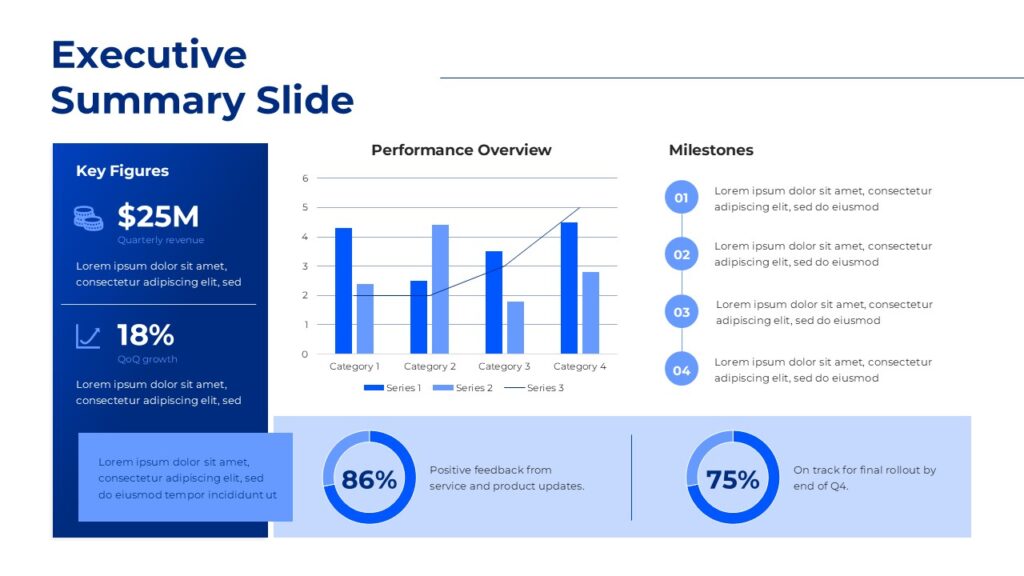
- Executive summary: Overall RAG status, 2 to 3 key highlights, and the most critical item requiring stakeholder attention.
- Progress summary: Milestones achieved this period, with completion percentages if appropriate.
- Schedule and budget health: Visual comparison of planned versus actual for timeline and spend.
- Risks and issues log: Top 3 to 5 risks or issues, each with a RAG status, owner, and mitigation action.
- Decisions required: A dedicated slide for any decisions or approvals needed. This respects the stakeholders’ time and makes your ask explicit.
- Next steps: What the team will do in the next reporting period.
8. Using pre-built templates to save time and look professional
Here is a reality of corporate life: you rarely have time to design a slide deck from scratch. And even when you do, design is a skill that most professionals have not spent years honing. This is where pre-built presentation templates become genuinely valuable.
A good project status report template gives you a professionally designed structure that you simply fill in. You get clean visual hierarchy, consistent typography, thoughtful use of color, and purpose-built layouts for things like RAG status indicators and milestone trackers, without needing to design any of it yourself.
What to look for in a status report template
- A clear executive summary slide with a prominent RAG status indicator
- Pre-designed milestone or timeline visualizations
- A risks and issues layout with status columns
- Consistent color coding for on-track, at-risk, and off-track states
- Easy-to-edit charts and progress bars
- A clean, professional aesthetic that works for senior audiences
| Recommended resource: SlidePick offers a library of professionally designed project status report templates built specifically for corporate presentations. Choose a template, drop in your project data, and walk into your next stakeholder meeting with slides that look polished and purposeful. Visit slidepick.com to browse the full collection. |
Using a template is not cutting corners. It is working smart. The value you add is in the quality of your analysis, the accuracy of your reporting, and the clarity of your communication. Spending hours fighting with PowerPoint slide layouts is not the best use of that time.
When you download a template, treat it as a starting point. Customize the colors to match your organization’s brand, adapt the sections to your specific project structure, and remove any elements that do not apply. Over time, you will develop a go-to template that fits your regular reporting cadence perfectly.
9. How often should you report?
The right reporting frequency depends on the project’s duration, complexity, and the stakeholders involved. Here is a practical guide.
| Frequency | Best suited for | Typical format |
| Weekly | Short projects, fast-moving projects, or projects in a critical phase | Brief written update or a 2 to 3 slide deck |
| Bi-weekly | Mid-length projects with regular milestones | Standard status report template (5 to 8 slides or 1 to 2 pages) |
| Monthly | Long-running programs, stable phases with few dependencies | Full report with executive summary and detailed supporting data |
| Ad hoc | When a significant risk materializes, a milestone is reached, or a major decision is needed | Targeted briefing note or escalation slide |
As a general rule: if you are unsure how often to report, report more frequently rather than less. It is far better to give stakeholders information they did not need than to leave them wondering what is happening on a project they care about.
| Career tip: When you join a new project or organization, ask your manager explicitly: “What is the expected reporting cadence, and who should be on the distribution list?” Starting with a clear understanding of expectations will save you from both over-reporting and under-reporting. |
10. Quick-reference FAQ
What is the difference between a project status report and a project update email?
A status report is a structured, repeatable document with consistent sections (RAG status, risks, milestones, budget). A project update email is informal and typically less structured. In many organizations, the report is the source of record, and the email is simply a delivery mechanism for it.
How long should a project status report be?
For most corporate projects, aim for one to two pages in written form, or five to eight slides in a presentation. If your report is longer than that, you are likely including too much operational detail that belongs in a project log rather than a stakeholder report. Brevity is a sign of mastery, not laziness.
What if I do not have all the information I need?
Report what you know, and be transparent about what you do not know. It is perfectly acceptable to write “Vendor confirmation of delivery date is pending, expected by [date]. This is currently flagged as an Amber risk.” Never fabricate information or guess at figures. Uncertainty, reported honestly, is far less damaging than false confidence.
Should I always use PowerPoint or slides for a status report?
Not necessarily. Some organizations prefer written reports in Word or PDF. Others use project management tools like Jira, Asana, or Monday.com that have built-in reporting dashboards. Follow the convention in your organization and if there is not one, ask. When in doubt, a well-designed slide deck is rarely a wrong choice for a formal stakeholder audience.
Who should review the status report before I send it?
For your first few reports, always ask your direct manager or project lead to review before distribution. Once you have a feel for the expectations in your organization, you may have more autonomy. For reports going to senior leadership or external stakeholders, get a review regardless of experience.
Wrapping up
Project status reporting is one of the most practical skills you can develop as a professional. It keeps your stakeholders informed, builds trust, creates accountability, and gives you a clear-eyed view of how your project is actually performing.
The good news is that it is a learnable skill, and like most skills, it gets faster and easier with repetition. Start with the fundamentals: understand your audience, report honestly, and structure your information clearly.
And when it is time to present your report to stakeholders, do not let a poorly designed slide deck undermine the hard work you have put into the content. A great template gives you a professional foundation to build on, so you can focus your energy on the analysis and communication rather than the formatting.
Explore project status report templates at SlidePick.com.
Related Articles
 January 3rd, 2026
Create a High-Conversion Sales Pitch Presentation in 2026
Business Presentation Tips- January 23rd, 2026
What Is the Main Purpose of Developing a Business Pitch? The Complete 2026 Guide for Entrepreneurs
Business Presentation Tips - January 27th, 2026
How Do You Pitch a Business in 60 Seconds? The Complete Framework for Founders
Business Presentation Tips