- Why a Dedicated Onboarding Presentation Matters
- What to Include in an Onboarding Presentation for New Hires
- How to Structure Your Onboarding Presentation
- Common Mistakes to Avoid in Onboarding Presentations
- Onboarding Presentations for Remote and Hybrid Teams
- Save Time with Pre-Built Onboarding Templates from SlidePick
- Best Practices for Delivering an Onboarding Presentation
- How Long Should an Onboarding Presentation Be?
- Creating Role-Specific Onboarding Presentations
- How to Measure the Effectiveness of Your Onboarding Presentation
- Final Thoughts
Onboarding Presentation for New Hires: A Complete Guide

- Why a Dedicated Onboarding Presentation Matters
- What to Include in an Onboarding Presentation for New Hires
- How to Structure Your Onboarding Presentation
- Common Mistakes to Avoid in Onboarding Presentations
- Onboarding Presentations for Remote and Hybrid Teams
- Save Time with Pre-Built Onboarding Templates from SlidePick
- Best Practices for Delivering an Onboarding Presentation
- How Long Should an Onboarding Presentation Be?
- Creating Role-Specific Onboarding Presentations
- How to Measure the Effectiveness of Your Onboarding Presentation
- Final Thoughts


The first few days at a new job can feel overwhelming for anyone. New hires are absorbing information about company culture, processes, tools, people, and expectations all at once. A well-crafted onboarding presentation gives that experience structure. It signals to new employees that the organization is prepared for them, values their time, and is invested in setting them up for success.
This guide covers everything you need to build an onboarding presentation that actually works: what to include, how to structure it, common mistakes to avoid, and practical ways to save time without sacrificing quality.
Why a Dedicated Onboarding Presentation Matters
Many companies still rely on a mix of informal walkthroughs, scattered documents, and on-the-job learning to onboard new team members. While some of that is unavoidable, it leaves a lot to chance. Research consistently shows that structured onboarding leads to higher retention, faster time-to-productivity, and stronger employee engagement.
A dedicated onboarding presentation serves as the backbone of that structure. It:
- Gives new hires a clear, consistent overview of the company and their role
- Reduces anxiety by replacing uncertainty with information
- Ensures nothing critical gets missed regardless of who is delivering the orientation
- Reinforces your company brand and culture from day one
- Provides a reference document that new hires can revisit later
In short, a good onboarding presentation is not just a nice-to-have. It is a foundational investment in every new employee you bring on board.
What to Include in an Onboarding Presentation for New Hires
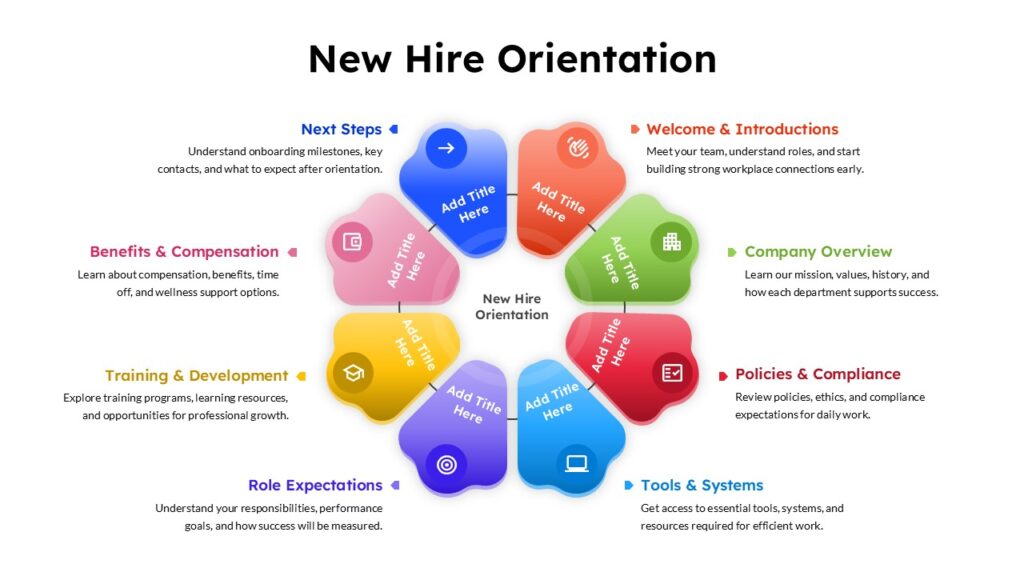
Not all onboarding presentations are the same, and that is fine. What you include will depend on company size, industry, and role. That said, most effective onboarding decks cover the following core areas.
1. Welcome and Introduction
Start with a genuine welcome. This section should set a warm, positive tone and help new hires feel that their arrival is anticipated and valued. Include a brief message from leadership (this can be a quote or a short video embed), an overview of who will be guiding them through onboarding, and a look at what the first week or month will look like.
This is also a good place to acknowledge that starting a new job is a big deal, and that the company is here to support them through the transition.
2. Company Overview
New hires often know the basics of your company from the interview process, but the onboarding presentation is your opportunity to go deeper. Cover the following:
- Company history and founding story
- Mission, vision, and core values
- Products or services offered
- Key milestones and achievements
- Current company size and structure
Keep this section focused. The goal is not to give a full company history lesson but to give new employees enough context to understand where they are joining and why it matters.
3. Organizational Structure and Team Overview
New hires need to understand where they fit in the bigger picture. Include an org chart or team map that shows reporting lines, key departments, and major team leads. If the organization is large, focus on the areas most relevant to the new hire’s role.
This section also helps new employees know who to go to for different questions or decisions, which reduces friction and builds confidence early on.
4. Role Expectations and Goals
One of the most important things you can communicate in an onboarding presentation is what success looks like. Outline:
- Key responsibilities and day-to-day duties
- Short-term goals for the first 30, 60, and 90 days
- Performance metrics and how they will be evaluated
- Who they will work with most closely
- Any immediate priorities or projects they are stepping into
When new hires know what is expected of them from the start, they can focus their energy on the right things rather than guessing.
5. Culture, Values, and Ways of Working
Company culture is one of those things that is hard to communicate in writing but absolutely needs to be addressed during onboarding. Use this section to bring your culture to life with real examples, stories, and visuals.
Cover how teams communicate, what collaboration looks like in practice, any rituals or traditions that define the workplace, and expectations around communication tools, meeting etiquette, and work-life balance.
This is also a good place to address diversity, equity, and inclusion commitments and how they show up in daily work.
6. Tools, Systems, and Processes
Give new hires a practical overview of the tools they will use on a daily basis. This typically includes:
- Communication tools (Slack, Teams, email)
- Project management platforms (Asana, Jira, Notion, etc.)
- Internal wikis or knowledge bases
- HR and payroll systems
- Any industry-specific software relevant to their role
You do not need to provide full tutorials in the presentation itself. A high-level overview with links or notes directing them to training resources is perfectly fine.
7. HR Policies and Important Information
Cover the essential policies and administrative information that every new hire needs to know. This includes benefits overview, leave policies, expense procedures, code of conduct, and any compliance or safety requirements specific to your industry.
Keep this section clear and digestible. Use simple language rather than policy-speak, and always point new hires to where they can find the full documentation if they need it.
8. Next Steps and Resources
End the presentation with a clear list of immediate next steps and a directory of resources and contacts. This gives new hires a sense of direction and reduces the chance of them feeling lost once the formal onboarding session wraps up.
How to Structure Your Onboarding Presentation
Content is only part of the equation. How you structure and present the information matters just as much. Here are a few structural principles that make onboarding presentations more effective.
Keep It Focused and Scannable
New hires are absorbing a lot in a short period of time. Avoid dense text slides. Use concise bullet points, visuals, and short headers to make information easy to scan and retain. Each slide should communicate one main idea.
Use Consistent Design
Your onboarding presentation is often one of the first things a new hire sees as a company-produced document. Consistent colors, fonts, and layouts that align with your brand identity make the presentation feel polished and professional. It also signals that your organization pays attention to quality.
Build in Interactivity Where Possible
A presentation does not have to be a one-way information dump. Consider adding short discussion prompts, icebreaker activities, or Q&A checkpoints throughout. This keeps new hires engaged and gives them space to ask questions in real time.
Tailor It to the Audience
A company-wide onboarding deck works well for covering universal information, but consider whether certain sections should be customized by department or role. A new software engineer and a new sales representative have very different day-to-day realities. Tailoring the relevant sections shows that you have thought about what actually matters to each employee.
Common Mistakes to Avoid in Onboarding Presentations
Even well-intentioned onboarding presentations can fall flat. Watch out for these common pitfalls:
- Information overload. Trying to cover everything in one session leads to cognitive fatigue. Spread the content across multiple sessions or phases if needed, and prioritize what is most critical for day one.
- Outdated content. An onboarding deck that references old org charts, discontinued tools, or outdated policies creates confusion and erodes trust. Set a regular review schedule to keep the content current.
- Too much text on slides. Slides with paragraphs of text are difficult to process during a live presentation. Use visuals, icons, and brief bullet points instead, with the presenter providing additional context verbally.
- No clear next steps. Ending the presentation without telling new hires what to do next leaves them feeling unmoored. Always close with a clear action plan.
- Ignoring the emotional experience. Starting a new job is nerve-wracking for most people. A presentation that is purely informational without acknowledging the human side misses an opportunity to build connection and trust early.
Onboarding Presentations for Remote and Hybrid Teams
Remote and hybrid onboarding comes with its own set of challenges. Without the organic social exposure of a physical office, new hires can feel isolated quickly. Your onboarding presentation plays an even more important role in these environments.
For remote teams, consider the following adjustments:
- Use an interactive digital format that new hires can navigate at their own pace in addition to any live sessions.
- Include video introductions from team leads and key colleagues to put faces to names early.
- Build in more explicit information about how remote communication norms work, including response time expectations and when to use different channels.
- Add links to virtual coffee chat booking tools or buddy program signups to encourage social connection.
- Make the deck shareable so new hires can revisit it easily from wherever they are working.
Save Time with Pre-Built Onboarding Templates from SlidePick
Building an onboarding presentation from scratch takes time that most HR teams and managers do not have. Between sourcing content, designing layouts, and making sure everything is on-brand, a well-structured deck can take hours to put together.
That is where SlidePick comes in. SlidePick offers a library of professionally designed slide templates built specifically for presentations like employee onboarding. Instead of starting from a blank canvas, you get a ready-made structure with polished layouts, placeholder sections for all the key onboarding content, and designs that look great out of the box.
Here is why HR professionals and team leads find SlidePick templates genuinely useful:
- Faster turnaround. A template cuts setup time dramatically. Rather than spending hours on design, you can focus on customizing the content to fit your company.
- Professional design without a designer. The templates are created with presentation design best practices in mind, so even if you are not a visual designer, the output looks clean and credible.
- Consistent structure. Pre-built templates ensure you cover all the key sections without having to remember what belongs in an onboarding deck from scratch every time.
- Easy to customize. SlidePick templates are built to be edited. You can swap in your brand colors, update placeholder text, add your company logo, and adjust the layout to fit your needs.
- Variety of formats. Whether you need a one-session overview deck, a multi-day onboarding plan, or a role-specific presentation, SlidePick has templates suited to different onboarding scenarios.
If your team is putting together an onboarding presentation and you want to skip the design headache, browsing SlidePick’s onboarding template collection is a practical starting point. You can find templates that suit a range of industries, company sizes, and onboarding formats, all ready to customize and use.
Best Practices for Delivering an Onboarding Presentation
Creating a strong presentation is one half of the work. Delivering it well is the other. Keep these delivery tips in mind:
- Pace yourself. New hires need time to absorb information. Avoid rushing through slides. Pause to check for understanding, invite questions, and allow moments of reflection.
- Be conversational. Reading directly from slides creates distance. Use the slides as a guide and fill in the story with your own words and examples.
- Introduce the people behind the information. Whenever possible, have relevant team members present their own sections rather than having one person cover everything. It helps new hires connect names to faces and responsibilities.
- Follow up after the session. Send new hires a copy of the presentation they can reference later, along with any links or documents mentioned. This reinforces what was covered and gives them a resource to return to.
- Gather feedback. Ask new hires what they found helpful and what they wished had been covered. This input is invaluable for improving the presentation over time.
How Long Should an Onboarding Presentation Be?
There is no single right answer, but a useful rule of thumb is to match the length of the presentation to the amount of information you genuinely need to convey, not to how comprehensive you want to appear.
For most organizations, a core onboarding presentation runs between 20 and 40 slides, which translates to roughly 60 to 90 minutes of presentation time with Q&A included. If you have more content than that, consider breaking the session into multiple parts spread across the first week rather than trying to fit everything into one sitting.
Quality over quantity always applies here. A focused 25-slide deck that covers what matters will serve new hires far better than a 70-slide marathon that exhausts them before lunch on day one.
Creating Role-Specific Onboarding Presentations
A general company onboarding deck is a great starting point, but the most effective onboarding programs supplement it with role-specific content tailored to the individual’s position.
Consider creating separate supplemental decks for:
- Department-level onboarding (e.g., Sales, Engineering, Marketing, Operations)
- Seniority level (e.g., individual contributors vs. managers)
- Remote vs. on-site employees
- Roles with specific compliance, certification, or safety requirements
This modular approach keeps each presentation focused and relevant while still ensuring all new hires get the universal company-wide information they need.
How to Measure the Effectiveness of Your Onboarding Presentation
Creating a great onboarding presentation is not a one-time project. It is a document that should evolve with your organization and improve with each new cohort of hires. To know where to improve, you need to measure how well it is working.
Some useful ways to measure effectiveness include:
- Post-onboarding surveys. A short survey sent at the end of the first week or month asking about clarity, helpfulness, and what was missing gives you direct feedback.
- Manager check-ins. Ask managers to flag whether new hires seem well-oriented in their first 30 days. If there are recurring knowledge gaps, that points to content that needs to be added or strengthened.
- Time-to-productivity metrics. If your organization tracks how quickly new hires reach full productivity, improvements in onboarding quality should show up in those numbers over time.
- Retention data. Early turnover is often linked to poor onboarding experiences. Tracking 90-day retention rates can be a useful indirect indicator.
Final Thoughts
A well-built onboarding presentation for new hires does more than convey information. It communicates that your organization is thoughtful, prepared, and committed to helping people succeed from the very beginning. That message matters more than most companies realize.
Whether you are building your first onboarding deck or refreshing one that has not been updated in years, the investment is worth it. Focus on the structure, keep the content relevant and digestible, and design it with the new hire experience in mind.
And if you want a head start on the design side, take a look at SlidePick’s onboarding presentation templates. With professionally designed layouts ready to customize, you can spend less time building slides and more time focusing on what really matters: welcoming your new hires the right way.
Related Articles
 March 25th, 2026
Post Mortem Meeting Agenda: A Complete Guide for Teams
Business Presentation Tips- January 23rd, 2026
What Is the Main Purpose of Developing a Business Pitch? The Complete 2026 Guide for Entrepreneurs
Business Presentation Tips - January 12th, 2026
Mock Presentation Best Practices for Feedback, Evaluation & Effective Delivery
Business Presentation Tips