The Complete Guide to Professional Meeting Minutes Format Templates

- What Are Meeting Minutes and Why Do They Matter?
- What Should Be Included in a Professional Meeting Minutes Format Template?
- Professional Meeting Minutes Format: A Sample Structure
- Types of Meeting Minutes Templates and When to Use Each
- How to Write Professional Meeting Minutes: A Step-by-Step Guide
- Common Mistakes in Meeting Minutes (And How to Avoid Them)
- Meeting Minutes Format Tips for Specific Industries
- How to Format Meeting Minutes for Maximum Readability
- Digital Tools and Templates for Meeting Minutes
- Frequently Asked Questions About Meeting Minutes
- Final Thoughts: Build a Meeting Minutes System That Works


Every professional has sat through a meeting, walked away with a list of tasks and decisions in their head, and then watched that clarity evaporate by the end of the week. The reason is almost always the same: no one wrote it down properly.
Meeting minutes are the official written record of what was discussed, decided, and assigned during a meeting. When formatted correctly, they serve as a reliable reference that keeps teams aligned, protects organizations legally, and drives accountability across every level of a business.
This guide covers everything you need to know about professional meeting minutes format templates, including what to include, how to structure different types of meetings, common mistakes to avoid, and where to find ready-to-use templates that make the whole process faster.
What Are Meeting Minutes and Why Do They Matter?
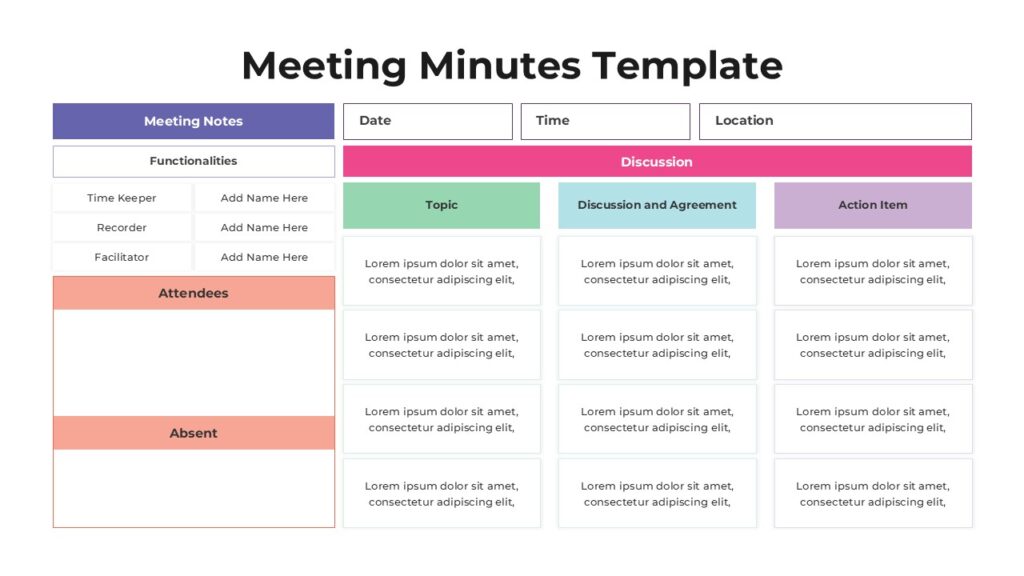
Meeting minutes are a formal record of what took place during a meeting. The term “minutes” comes from the Latin “minuta scriptura,” meaning small notes or rough draft. Despite the name, professional meeting minutes are anything but small. They carry significant weight in business, governance, and legal contexts.
Well-written meeting minutes serve multiple purposes:
- They create an official record of decisions made and votes taken.
- They assign accountability by documenting who is responsible for each action item.
- They allow absent stakeholders to stay informed without requiring a follow-up meeting.
- They provide legal protection for organizations, especially in board or committee settings.
- They serve as a reference point when disputes arise about what was agreed upon.
For businesses, nonprofits, government bodies, and academic institutions, proper meeting documentation is not optional. It is a professional standard that reflects the seriousness with which an organization operates.
What Should Be Included in a Professional Meeting Minutes Format Template?
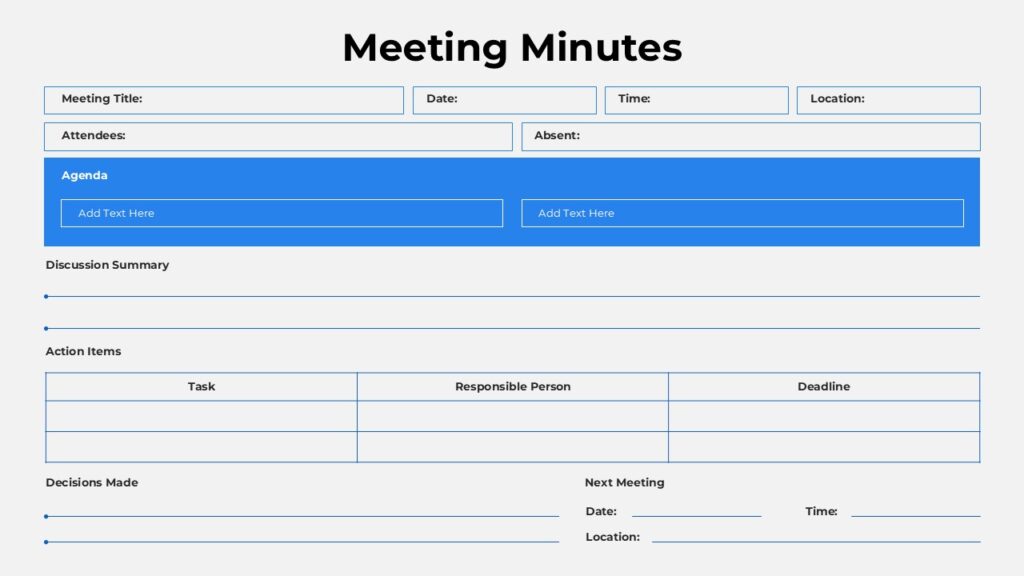
A professional meeting minutes format template is a structured document that captures all the essential elements of a meeting in a consistent, readable format. While the exact layout may vary depending on the organization or meeting type, the core sections remain the same.
1. Header Information
The top of the document should clearly identify the meeting. Include the following:
- Organization or company name
- Meeting type (for example: Board Meeting, Project Kickoff, Weekly Team Sync)
- Date, time, and location (or virtual platform used)
- Name of the person facilitating the meeting
- Name of the person recording the minutes
2. Attendees
List all participants who were present. For formal meetings, also note any members who were absent, particularly if their absence affects quorum. In larger organizations, it is common to include job titles alongside names.
3. Agenda Items
A professional format mirrors the structure of the meeting agenda. Each agenda item should be treated as its own section within the minutes. Under each item, document:
- A summary of the discussion
- Any decisions made
- Action items assigned (with the responsible person and deadline)
4. Decisions and Resolutions
Clearly state every decision that was made. If votes were taken, note the outcome. For formal board meetings, document voting records precisely, including who voted in favor, who voted against, and any abstentions.
5. Action Items
This section is arguably the most important for day-to-day usefulness. A dedicated action item table or list should capture:
- The specific task to be completed
- The name of the person responsible
- The deadline or target date
6. Next Meeting Details
If the next meeting was scheduled during the current one, include the date, time, and location at the bottom of the minutes.
7. Approval and Signatures
In formal settings, meeting minutes are reviewed and approved at the next meeting. Space for signatures or an approval notation at the bottom of the document indicates the minutes have been verified.
Professional Meeting Minutes Format: A Sample Structure
The table below outlines the key sections of a professional meeting minutes format template and what each section should contain.
| Section | What to Include |
| Meeting Header | Organization name, meeting type, date, time, location, facilitator, recorder |
| Attendees | Names (and titles if formal), note absences |
| Agenda Item 1 | Discussion summary, decisions made, votes (if any) |
| Agenda Item 2 | Discussion summary, decisions made, action items assigned |
| Action Items | Task, responsible person, deadline |
| Next Meeting | Date, time, location |
| Approval | Signature lines or approval date |
Types of Meeting Minutes Templates and When to Use Each
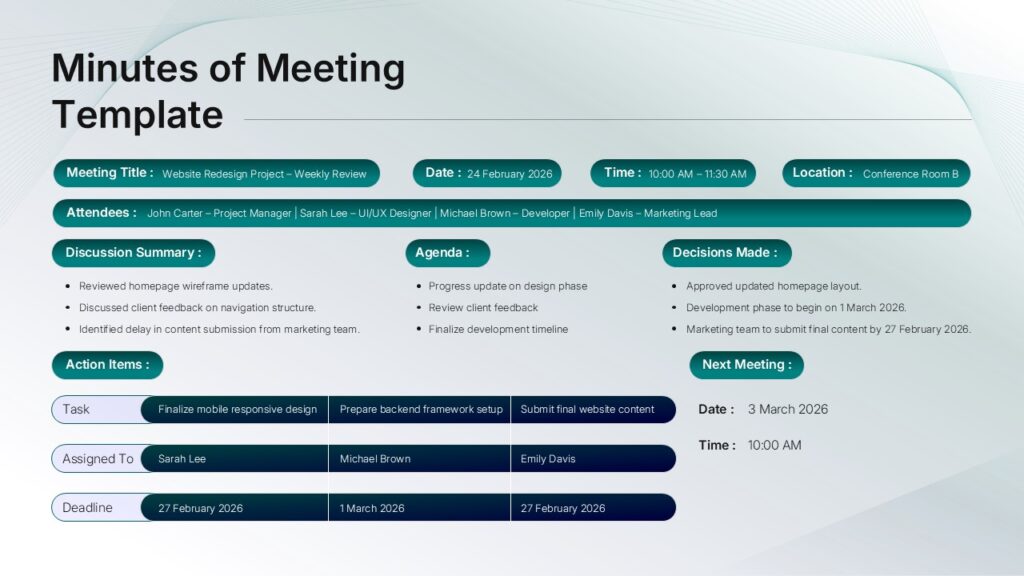
Not every meeting requires the same level of documentation. Understanding which format to use for which type of meeting saves time and ensures the right level of detail is captured.
Board Meeting Minutes Template
Board meetings require the most formal style of minutes. These are legal documents in many jurisdictions and must meet specific standards set by corporate bylaws or nonprofit governance policies. Board meeting minutes typically include roll call, quorum verification, motions and voting results, and resolutions passed.
If you present meeting updates to a board, pairing your minutes with a clean slide deck makes a real difference. SlidePick offers professionally designed presentation templates specifically built for board-level communication, making it easier to present key decisions and outcomes alongside the written record.
Project Kickoff Meeting Minutes Template
Kickoff meetings set the tone for an entire project. Minutes from these sessions should capture the project scope, team roles and responsibilities, key milestones, and any open questions that were raised. A clear action item section is especially critical here since kickoff meetings generate a high volume of next steps.
Weekly Team Meeting Minutes Template
For recurring internal meetings, a lighter format works best. The goal is speed and clarity rather than formal record-keeping. A simple template with standing agenda items, quick decision notes, and a running action item list is often all that is needed.
Annual General Meeting (AGM) Minutes Template
AGM minutes follow formal protocols and are often filed with regulatory bodies. They require detailed records of attendance, financial reports reviewed, elections held, resolutions passed, and any special business discussed.
Committee Meeting Minutes Template
Committees operating within larger organizations benefit from a template that mirrors their reporting structure. Minutes should be easy to summarize for parent body reports, which means clear headings, concise action items, and a consistent format meeting after meeting.
One-on-One Meeting Notes Template
One-on-one meetings between managers and direct reports may not require formal minutes, but a consistent note-taking structure still adds value. Documenting discussion topics, feedback shared, goals reviewed, and follow-up items creates a useful record that supports performance conversations and career development planning.
How to Write Professional Meeting Minutes: A Step-by-Step Guide
Knowing the format is only half the battle. How you approach the actual writing process determines whether your minutes are useful or just a formality that nobody reads.
Before the Meeting
- Review the agenda so you understand what will be discussed and can prepare your template accordingly.
- Set up your template in advance, filling in the header information and pre-listing agenda items.
- Confirm who will be attending and note any expected absences.
- Clarify with the meeting facilitator if there are any formal motions or votes expected.
During the Meeting
- Focus on capturing decisions, not transcribing conversation. You do not need to record every word spoken.
- Note who raised each major point only when attribution matters (for example, who made a motion).
- Write down action items immediately as they are assigned, including the person responsible and the deadline.
- If a vote is taken, note the exact count or indicate unanimous agreement.
- Flag any items that are tabled or deferred to a later meeting.
After the Meeting
- Review and clean up your notes while the meeting is still fresh in your mind, ideally within a few hours.
- Send a draft to the meeting facilitator for review before distributing to the full group.
- Distribute the minutes to all attendees and relevant stakeholders within 24 hours of the meeting.
- File the approved minutes in a location where they can be easily retrieved (shared drive, document management system, or meeting management platform).
- At the next meeting, present the minutes for formal approval and note any corrections.
| Pro Tip: Separate Notes from Minutes Personal notes taken during a meeting and official meeting minutes are two different things. Personal notes can be informal and incomplete. Official minutes should be polished, objective, and free of personal opinions. When in doubt, write minutes as if they will be read by someone who was not in the room and needs to understand exactly what was decided and why. |
Common Mistakes in Meeting Minutes (And How to Avoid Them)
Even experienced professionals make avoidable errors when documenting meetings. Here are the most common issues and how to address them.
Recording Too Much Detail
Minutes should capture decisions and actions, not a word-for-word transcript of the conversation. Recording every back-and-forth makes the document hard to read and buries the most important information. Aim for clear, concise summaries of each discussion point.
Using Vague Language for Action Items
“Follow up on the marketing plan” is not a useful action item. “Sarah to send revised marketing plan to the team by March 28” is. Every action item needs a specific task, a named individual, and a concrete deadline.
Waiting Too Long to Write Up the Minutes
The longer you wait after a meeting to write up the minutes, the more detail is lost. Even excellent notes become unclear without the mental context of having just been in the room. Make it a habit to finalize and distribute minutes the same day or within 24 hours.
Inconsistent Formatting Across Meetings
When meeting minutes look different every time, they become harder to scan and compare over time. Using a consistent template, whether it is a Word document, a shared doc, or a purpose-built platform, keeps your documentation professional and easy to navigate.
Failing to Get Minutes Approved
In formal settings, unapproved minutes are not the official record. Always include a step in your process for the minutes to be reviewed and approved, either informally by the facilitator or formally by the group at the next meeting.
Meeting Minutes Format Tips for Specific Industries
Different industries have different expectations and sometimes different legal requirements for meeting documentation. Here is a quick reference for some common sectors.
| Industry | Key Formatting Considerations |
| Corporate / Business | Include quorum verification, formal motions, and voting records for board-level meetings. Use a standard template approved by legal or compliance teams. |
| Nonprofit | AGM and board minutes may need to meet regulatory requirements. Document officer elections, financial approvals, and conflict of interest disclosures. |
| Legal / Law Firms | Minutes must be precise and defensible. Avoid ambiguous language. Retain approved copies as part of the formal file. |
| Healthcare | Meetings involving patient care standards or committee reviews often require detailed records for accreditation purposes. |
| Education | School board and faculty senate meetings follow formal parliamentary procedures. Motions, seconds, and votes must all be recorded. |
| Startups | Lighter formats work for early-stage teams, but investor board meetings require full corporate-standard minutes. |
How to Format Meeting Minutes for Maximum Readability
Content accuracy is essential, but presentation matters too. Meeting minutes that are hard to read do not get read. Follow these formatting best practices to make your minutes as useful as possible.
- Use clear, descriptive headings for each agenda item so readers can navigate directly to what they need.
- Keep paragraphs short. One or two sentences per point is usually enough.
- Use a dedicated action item table with columns for task, owner, and deadline rather than burying actions in paragraph text.
- Use consistent fonts, sizes, and spacing throughout the document.
- Bold key decisions and action items so they stand out when someone scans the document quickly.
- Number pages, especially for formal minutes that will be filed or distributed widely.
- Use objective, neutral language. Avoid editorializing or characterizing how people responded emotionally.
If meeting minutes will be shared as part of a broader presentation, such as a report to stakeholders or a board update, formatting consistency between your written minutes and your slide deck creates a more polished and professional impression overall.
This is one area where having a go-to resource for templates pays off. SlidePick provides a growing library of pre-built presentation templates covering board updates, project reporting, team briefings, and more. When your meeting minutes and your presentation materials share the same professional visual language, the overall communication lands with greater clarity and credibility.
Digital Tools and Templates for Meeting Minutes
The days of handwriting meeting notes on a legal pad and hoping you can read your own handwriting later are over. A range of digital tools exists to make meeting documentation faster, more consistent, and easier to share.
Word Processing Templates
Microsoft Word and Google Docs both support template-based workflows. Creating a reusable meeting minutes template in either platform is straightforward and ensures that every meeting is documented in the same format. You can lock certain fields, add dropdown menus for meeting type, and set up a consistent style guide that the whole team follows.
Meeting Management Platforms
Tools like Fellow, Notion, and Confluence allow teams to build meeting workflows that combine agendas, notes, and action items in one place. These platforms make it easy to assign action items directly, track completion, and link meeting records to related projects.
AI-Assisted Note-Taking
An increasing number of teams are using AI transcription and summarization tools to generate draft meeting minutes automatically. While these tools are improving rapidly, human review is still essential, particularly for formal meetings where precision and accuracy are required.
Presentation Templates for Meeting Reporting
When meeting outcomes need to be communicated visually, to a leadership team, a client, or a broader organization, a well-designed slide deck makes the information easier to absorb and act on.
SlidePick offers a wide selection of professionally designed presentation templates for exactly these situations. Whether you are presenting board meeting highlights, sharing a project status update, or walking stakeholders through quarterly results, having a polished template ready to go means you spend your time on the content rather than the design. You can browse SlidePick’s template library at slidepick.com to find options that match your meeting type and communication style.
| Why Template Consistency Matters Organizations that use consistent meeting minutes templates across all departments and meeting types reduce confusion, improve compliance, and make it easier to train new team members on documentation standards. A single approved template, used every time, is more valuable than a dozen creative variations. |
Frequently Asked Questions About Meeting Minutes
How long should meeting minutes be?
There is no fixed length, but most professional meeting minutes run between one and three pages for a standard business meeting. Board meetings and formal committee sessions may run longer depending on the agenda. Focus on capturing what matters rather than hitting a word count.
Who is responsible for taking meeting minutes?
In most organizations, a designated secretary or administrative coordinator is responsible for meeting minutes. In smaller teams, the responsibility may rotate among team members. Whoever takes the minutes should not be expected to actively lead or facilitate the discussion at the same time.
Are meeting minutes legally binding?
Approved meeting minutes can carry legal weight, particularly for boards of directors, nonprofit organizations, and government bodies. They serve as the official record of decisions made and can be referenced in legal proceedings. For formal organizations, minutes should be stored securely and retained according to the organization’s document retention policy.
What is the difference between meeting minutes and meeting notes?
Meeting notes are informal records taken for personal reference. Meeting minutes are the official, approved documentation of a formal meeting. Notes can be subjective and incomplete. Minutes should be objective, comprehensive, and approved by the relevant stakeholders.
How quickly should meeting minutes be distributed?
Best practice is to distribute meeting minutes within 24 hours of the meeting. For time-sensitive action items or fast-moving projects, distributing within a few hours is even better. The sooner the minutes go out, the sooner people can begin acting on their assigned tasks.
Can I use a presentation to share meeting minutes?
Absolutely. For board reports, executive briefings, or stakeholder updates, presenting key meeting outcomes as a slide deck is an effective way to communicate information visually. SlidePick offers a range of presentation templates designed for exactly this purpose, covering everything from board meeting summaries to project status reports. A well-designed deck paired with formal written minutes gives stakeholders both the detail they need and the visual clarity that makes information easy to absorb quickly.
Final Thoughts: Build a Meeting Minutes System That Works
A professional meeting minutes format template is more than a blank document you fill in after every meeting. It is the foundation of a documentation system that builds trust, drives accountability, and keeps your organization moving in the right direction.
The best meeting minutes are consistent, clear, and distributed quickly. They capture what was decided and who is responsible for what, without burying the essential information under unnecessary detail. When you combine a solid template with good habits around preparation, note-taking, and follow-through, meeting documentation stops feeling like an administrative burden and starts working as a genuine communication tool.
Whether you are documenting board decisions, project milestones, or weekly team check-ins, having the right format ready before the meeting starts makes everything easier. And when those meeting outcomes need to be communicated more broadly, a polished presentation template from SlidePick can help you do that with the same level of professionalism you put into the written record.
Visit slidepick.com to explore their full library of presentation templates. From board meeting reports to project kickoff decks, there is a template designed to make your next communication as effective as possible.
Related Articles
 March 31st, 2026
SlidePick: Moving from Mobile App to Presentation Templates
Uncategorized